Install Minemories
Minecraft Java on a computer · about 10 minutes · your worlds stay untouched.
Just here to view a shared memory? Open its link: there is nothing to install. Need help?
Which Minecraft version do you play?
Pick the version of Minecraft Java you launch. The mod file must match it.
| Minecraft | Loaders | Java |
|---|---|---|
| 1.21.11 | Fabric, NeoForge, Forge | 21 |
| 1.21.1Most tested | NeoForge, Fabric, Forge | 21 |
| 1.20.1 | Forge, Fabric | 17 |
| 1.19.2 | Forge, Fabric | 17 |
| 1.18.2 | Forge | 17 |
| 26.3Experimental | Fabric | 25 |
I don’t know
Your version shows in your launcher, next to the Play button, and at the bottom left of the Minecraft menu.
Which mod loader do you use?
A loader is what lets Minecraft run mods. Pick the one your profile uses.
No loader yet? We’ll install one together in the loader step below.
On Fabric, add Fabric API. In 1.21.1, Quilt works with the Fabric JAR.
How do you add your mods?
- With the CurseForge app: The app installs Minemories and what it needs.
- I add the file myself: Official launcher, Prism or another one: you download one file and drop it in a folder.
Install the loader
Only if you have no mod loader yet.
- Minecraft 1.21.11: the Fabric installer, with Java 21.
- Minecraft 1.21.1: the Fabric installer, with Java 21.
- Minecraft 1.20.1: the Fabric installer, with Java 17.
- Minecraft 1.19.2: the Fabric installer, with Java 17.
- Minecraft 1.18.2: the Forge 40.3.12 installer, with Java 17.
- Minecraft 26.3: the Fabric installer, with Java 25.
Open the installer, pick your Minecraft version, then install the client. Launch the new profile once, then close the game.
Install it with the CurseForge app
Only if you use the CurseForge app.
- Create a profile with your Minecraft version and loader, or open yours.
- Search for Minemories, then install it.
On Fabric, the app also adds Fabric API.
Download the mod
Only if you add the file yourself.
Get the JAR that matches your version and loader: All downloads.
Do I run this file?
No: you just copy it into the mods folder. Only a loader installer opens with Java.
Put it in the mods folder
Close Minecraft completely before copying the file.
- Open the mods folder. With the official Minecraft Launcher, it’s here by default:
- Windows:
%APPDATA%\.minecraft\modsPress Windows + R, paste this path, then press Enter. - macOS:
~/Library/Application Support/minecraft/modsIn Finder, choose Go → Go to Folder (Shift + Cmd + G), paste this path, then press Enter. - Linux:
~/.minecraft/modsIn your file manager, press Ctrl + L, paste this path, then press Enter.
- Windows:
- No mods folder? Create one called mods, all lowercase.
- Copy the JAR into it. Keep only one Minemories JAR: remove the old one when you update.
Using Prism or another launcher?
Each profile has its own folder: open it from the launcher, then go into mods.
Check that it works
Launch Minecraft with your loader’s profile, then open a world.
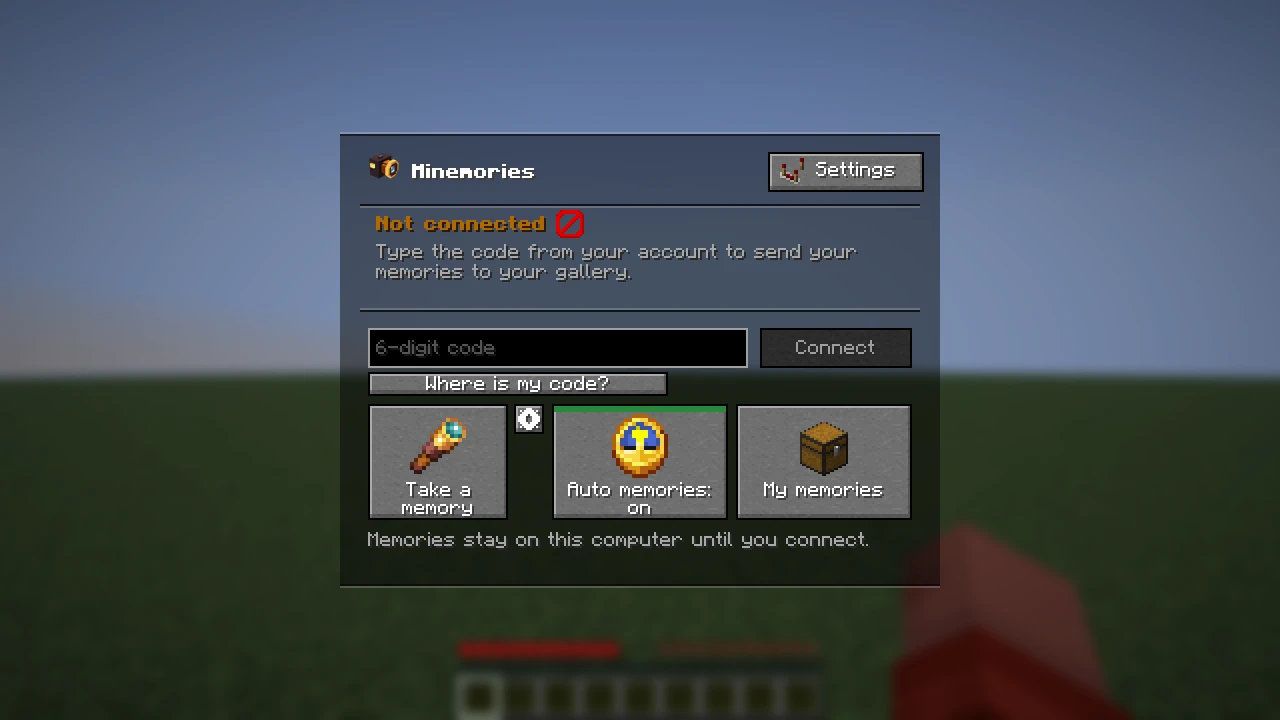
In a world, press M: the Minemories menu opens. It’s also in Options (the Minemories icon).
The menu opens? The mod is installed.
Connect the game
Create your account, open your gallery and get the 6-digit code. In Minecraft: M → type the code → Connect.
Your first memory
Press M → Take a memory. It then goes to your gallery on its own.
Memories taken before you connected? M → My memories → Send this memory.
Without an account
Your memory stays as a GLB file in the export folder of your home folder. It opens in Blender.
- Windows:
C:\Users\<you>\export - macOS:
/Users/<you>/export - Linux:
/home/<you>/export
If a step gets stuck
The loader installer won’t open?
It needs Java: install Temurin first. Then right-click the installer → Open with → Java. On macOS or Linux, open a terminal in its folder and type java -jar followed by the file name. Don’t lower your security settings to get it running.
The mod doesn’t show up?
The file must end in .jar, not .jar.zip, and sit in mods, not in saves. Launch the profile of the loader you picked, in the same Minecraft version.
M opens something else?
Another mod uses M. Go through Options → Minemories, or change the key in Options → Controls → Key Binds.
The game crashes on launch?
Check that the JAR matches your version and your loader, and that Fabric API is there on Fabric. To go back, take the Minemories JAR out of mods. Never delete your world to fix it.
The code doesn’t work?
It expires after 5 minutes and works only once. Generate another one. Your local file is safe.
Part of the build is missing?
Move closer, make the memory bigger, or select an area between two corners.
Minemories is experimental: start with a test world and keep your local files.